Оновлено 24 листопада 2026 · 16 хвилин читання

Світлана відповідає за навчання вчителів у приватній школі. У понеділок вона збирає презентацію з чотирнадцяти слайдів про оцінювання. О 21:40 директор просить інший шрифт і акцентний колір під фірмовий стиль школи.
У більшості програм це означає ходити по слайдах і міняти текст вручну. У ПростоСлайдері Світлана відкриває одне меню, обирає шрифт і колір, і чотирнадцять слайдів перебудовуються разом. Вона виходить із програми о 21:45.
Якщо презентацію збирає одна людина і вам потрібен конструктор презентацій, у якому шрифт і колір усієї презентації міняються одним рухом, беріть ПростоСлайдер: Morph між слайдами, експорт у PPTX, PDF і DOCX, п’ять презентацій безкоштовно.
Canva виграє дизайнерськими матеріалами, Google Slides спільною роботою, PowerPoint потужністю без мережі, Pitch командними презентаціями.
ПростоСлайдер розробляє команда цього сайту, тому порівняння нейтральним бути не може. Ми прямо пишемо, чого в ньому немає.
Ціни конкурентів узято з публічних сторінок і оглядів цін 24 листопада 2026 року й перераховано за курсом 42 грн за долар. Тарифи змінюються часто, тож перед покупкою відкрийте сторінку тарифів.
Конструктор презентацій очима людини: що просять, коли кажуть «зроби як Pitch»
ПростоСлайдер почався з довгого списку побажань. Ми хотіли виключно те, що потрібно для презентації: типи тексту, які міняються на всіх слайдах разом, фігури й картинки де завгодно, переходи Morph, поява об’єктів, номери слайдів, відкриття й збереження в PPTX, PDF чи DOCX.
Потім почалося найцікавіше: реальні відгуки. Перша версія редактора мала купу кнопок. Реакція була коротка: «щось ти перемудрив, де менюшка ділася?». Ми прибрали зайве й зробили редактор тихішим, ближчим до Apple, ніж до панелі літака.
Те, чого просила людина, яка збирає по десять презентацій на місяць
Змінив шрифт один раз, і всі слайди перебудувалися. Для цього я й шукав конструктор презентацій.
Далі кожен відгук ставав окремою функцією. Ось що люди насправді просили:
- двічі клацнути по тексту й одразу писати, як у Word, а не шукати окреме вікно;
- щоб слайди в прев’ю не налазили одне на одне, а текст не налазив на картинку;
- обрізати картинку з масштабуванням і додати тінь;
- залишити лише прості анімації й зробити їх помітними;
- виділити кілька об’єктів і рухати їх разом;
- показувати презентацію з планшета й закривати показ пальцем;
- щоб усе працювало навіть без інтернету.
Кожен із цих пунктів ми розберемо нижче, з тим, що вийшло насправді.
Що треба від конструктора презентацій для уроку чи лекції
Конструктор презентацій для уроку має давати чотири речі: чистий вигляд без «дизайнерської» метушні, зміну стилю для всієї презентації одним кліком, надійний файл для чужого комп’ютера й швидкий старт. Решта функцій потрібна рідше, ніж здається.
- Єдиний стиль. Шрифт і колір змінюються один раз.
- Файл, що відкриється всюди. PPTX для PowerPoint у залі, PDF для розсилки.
- Швидкий старт. Готові шаблони замість порожнього слайда.
- Кирилиця без сюрпризів. Усі шрифти перевірені на українські літери.

Конструктор презентацій і вісім типів тексту: змінили раз, зміна пройшла всюди
Серце ПростоСлайдера це вісім типів тексту: величезний, H1, H2, H3, звичайний, дрібний, тег і цитата. Для кожного типу своє меню: шрифт, насиченість, розмір, міжряддя, регістр і колір. Ви змінили H1 один раз, і всі заголовки на всіх слайдах стали іншими.
Тому конструктор презентацій і відрізняється від звичайного редактора: стиль живе на рівні всієї презентації, а слайди його лише наслідують. Захотіли інший шрифт о пів на десяту вечора? Це два кліки замість чотирнадцяти слайдів вручну.
Усі вісім типів тексту й для чого вони+
Величезний: одне гасло чи велика цифра на слайд. H1: заголовок слайда. H2 і H3: підзаголовки й підписи блоків. Звичайний: основний текст. Дрібний: примітки й джерела. Тег: маленька мітка над заголовком, на кшталт «Інвесторам». Цитата: курсив в ялинках, для відгуків і висловів.
Тип «цитата» з’явився пізніше за інші, бо в першому списку його не було. Людина просто сказала: «додай ще Цитату, це зазвичай курсив у лапках».
22 шрифти, які справді мають українські літери+
У редакторі двадцять шрифтів і додатково Arial та Times New Roman. Кожен шрифт проходить автоматичну перевірку на всі літери українського алфавіту, зокрема Ґ, Є, І, Ї. Шрифти без кирилиці з переліку прибрано, щоб ніхто не побачив ромбики зі знаками питання.
Morph між слайдами: скопіював, змінив, і воно перетікає
Це улюблена функція, яку ми й показали на лендінгу інтерактивно. Скопіюйте об’єкт на наступний слайд і змініть його розмір чи місце: у показі він плавно перетече.
Маленький акцент на цифрі першого слайда на другому стає великим, і це красиво, бо дві секунди рухається саме те, на що треба дивитися.
Вручну це налаштовувати не треба. Конструктор презентацій сам зв’язує схожі об’єкти сусідніх слайдів. Скопіювали фігуру через Ctrl+C і Ctrl+V на наступний слайд, змінили її, і зв’язок збережено. У PPTX це стає переходом Morph, який розуміє PowerPoint.
Анімації: лише п’ять, зате помітні
Наша перша версія мала цілу бібліотеку ефектів, і вони працювали «коряво». Тому залишили п’ять: поява та виліт справа, зліва, зверху й знизу. Швидше за секунду анімації взагалі не бувають, за замовчуванням стоїть дві секунди, щоб глядач встиг побачити рух.
Порядок анімацій тепер видно одним поглядом, як у Pitch: компактний список, де кожен рядок це об’єкт. Тут працює кілька дрібниць, яких просили:
- виділіть кілька об’єктів і задайте їм один ефект, щоб вони з’явилися разом;
- перетягніть номер кроку, і зміститься весь крок разом з об’єктами;
- киньте рядок на інший рядок, і він з’явиться разом із ним;
- кошик біля рядка прибирає анімацію з об’єкта.
Чому не десять ефектів, а п’ять+
Людина, яка збирає презентацію для уроку, використовує одну-дві анімації й забуває про решту. Десять ефектів роблять меню довшим і слайд безладнішим. П’ять простих працюють завжди, а Morph закриває все цікаве.
Редактор: двічі клацнули й пишете, як у Word
Це був найгучніший відгук: «я ДОСІ не можу змінювати текст, який відкривається в шаблоні». Після виправлення подвійний клік по будь-якому тексту відкриває звичайне редагування просто на слайді.
Над текстом з’являється плаваюче меню: тип, розмір, колір, жирний, курсив, підкреслений, закреслений, регістр, вирівнювання. Стиль застосовується до виділеного фрагмента чи до всього блоку.
Рамка тексту сама підлаштовується під висоту, тож великих порожніх рамок немає. З картинками теж є зручність: кнопка «Обрізати» з масштабуванням, тінь, форма обрізання, шари й обертання. Коли розтягуєте обрізану картинку, вона масштабується разом з рамкою, а не вилазить за свій оригінал.
Виділення кількох об’єктів і вирівнювання+
Рамкою мишки виділяєте кілька об’єктів, і їх можна разом рухати, збільшувати, зменшувати й вирівнювати. Редактор допомагає з розмірами й краями, як у Дошці: лінії вирівнювання, однакові відступи.
Чотири кнопки під слайдом+
Під слайдом чотири кнопки: попередній слайд, наступний, додати новий після і додати новий перед. Список мініатюр зліва не стрибає на самий верх, коли ви клацаєте на слайд внизу списку. Дрібниці, які відчуваєш лише коли їх немає.
Показ: збільшення картинок і хрестик на планшеті
У показі працює приємна дрібниця з Pitch: клацаєте по картинці, і вона збільшується, залишаючи по двадцять пікселів від краю, а фон розмивається. Це виручає, коли на слайді купа маленьких фото. Навіть вертикальна картинка на горизонтальному слайді збільшується зі збереженням пропорцій.
А якщо ви ведете презентацію з планшета, торкніться слайда, і справа зверху з’явиться хрестик. Він закриває показ і повертає в редактор. Усе без клавіатури.
Конструктор презентацій з готовими шаблонами: чотирнадцять тем
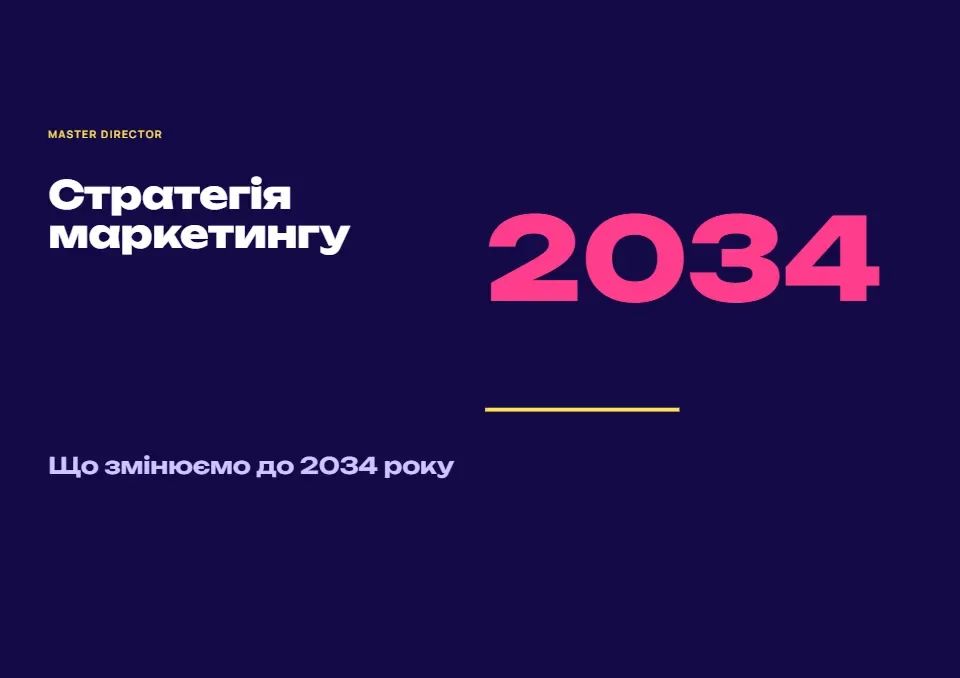
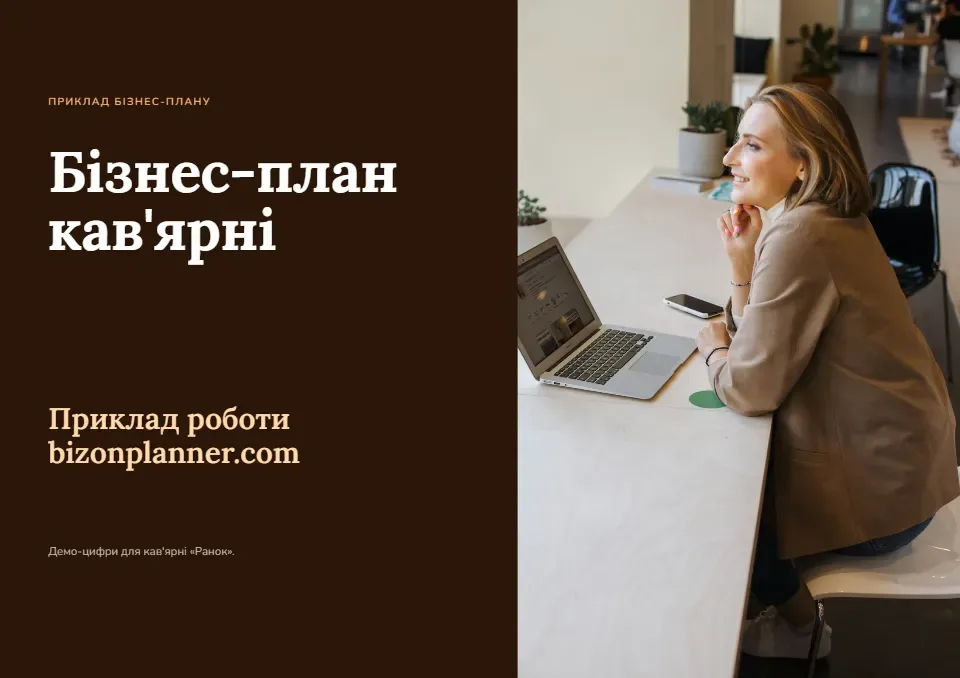
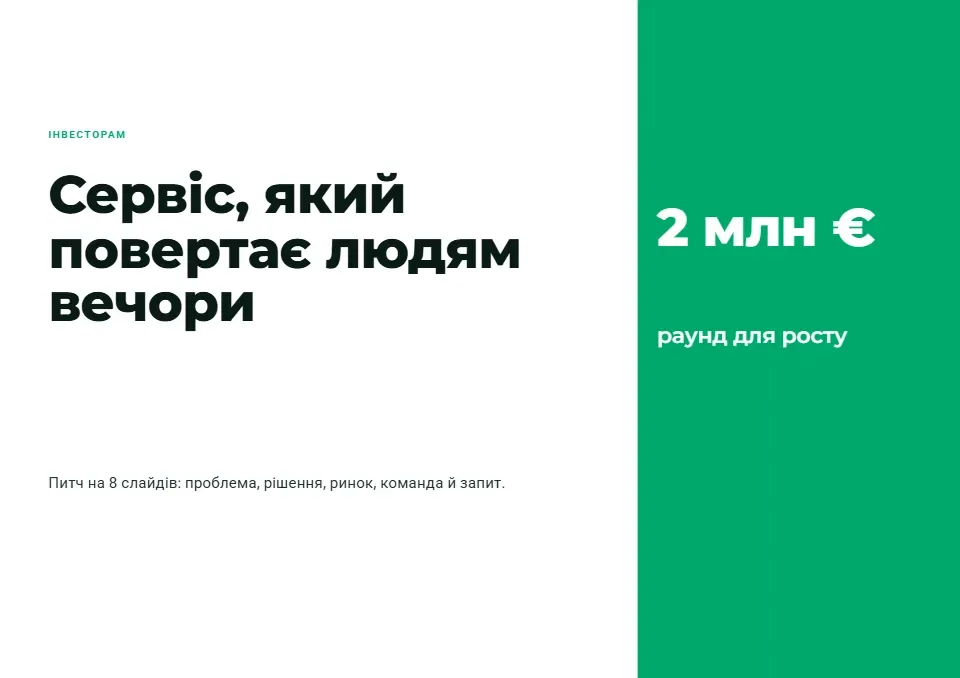
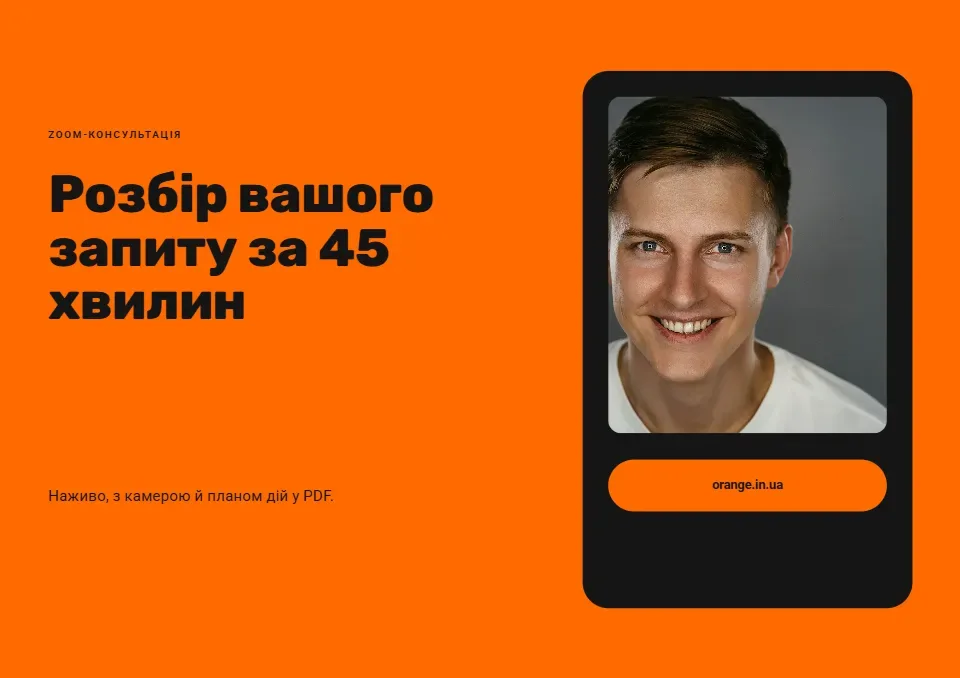
Порожній слайд лякає. Тому у бібліотеці чотирнадцять готових презентацій: безкоштовний гайд, недорогий продукт, основна послуга, преміум-пропозиція, стартап-модель, колекція з тринадцяти макетів, наука, бізнес-план кав’ярні, Zoom-консультація, переваги Дошки, стратегія 2034, питч для інвесторів, звіт і курс.
Кожен зібрано по-своєму: глибокі кольори, великі блоки, багато повітря й Morph. Тексти й фото міняєте на свої, і презентація готова. Перед виходом шаблони перевіряє автоматичний тест: текст не налазить на картинку чи інший текст, і жодного абзацу довше за три рядки.
Як шаблони пов’язані з нашими іншими інструментами+
Шаблон «Бізнес-план кав’ярні» показує структуру, яку ми використовуємо в Bizon Planner. Шаблон «Переваги Дошки» коротко розповідає про Дошку. Питч для інвесторів складається з восьми слайдів: проблема, рішення, ринок, команда, запит.
Конструктор презентацій і файли: PPTX, PDF і DOCX
Конструктор презентацій має сенс лише тоді, коли файл відкривається там, де вам треба.
ПростоСлайдер відкриває PPTX з PowerPoint, а зберігає в PPTX, PDF чи DOCX із живим текстом: його можна виділити, скопіювати й виправити. Експорт у DOCX потрібен, коли презентацію треба здати як текстовий документ.
Є й чесні обмеження. Шрифти не вбудовуються в PPTX та DOCX, тому на чужому комп’ютері без цього шрифта PowerPoint підставить свій. Ефекти по літерах у PPTX стають простим згасанням. Якщо вам важливий точний вигляд, зберігайте PDF.
Як перевірити, що файл виглядатиме так, як у браузері+
Експортуйте PDF: у ньому всі шрифти вбудовано, і вигляд збігається з редактором. Якщо потрібен саме PPTX, відкрийте його на комп’ютері людини, яка виступатиме, і перегляньте шрифти. Це п’ять хвилин, які рятують від сюрпризу на сцені.
Порівняльна таблиця: конструктор презентацій ПростоСлайдер, Pitch, Canva, Google Slides і PowerPoint
Порівнюємо за тим, що відчуває людина: скільки коштує рік, чи міняється стиль усієї презентації одним рухом, чи є Morph, чи працює без інтернету. Ціни наведено на 24 листопада 2026 року.
| Інструмент | Безкоштовно | Платно за рік для одного автора | Стиль усіх слайдів | Morph і анімації | Експорт | Без інтернету |
|---|---|---|---|---|---|---|
| ПростоСлайдер | 5 презентацій, 3 картинки в кожній | 1 080 грн | одне меню шрифту й кольору | автоматичний Morph, 5 анімацій | PPTX, PDF, DOCX | програма для Windows |
| Pitch | є, з обмеженнями | від $8 до $17 за редактора на місяць, це від 4 000 до 8 600 грн | теми | є | PPTX, PDF | ні |
| Canva | є, з обмеженнями | Pro від $144 до $180 на рік, це від 6 000 до 7 600 грн | набір бренду на платних тарифах | є | PPTX, PDF, картинки | ні |
| Google Slides | так | 0 грн, є платні плани Workspace | редактор теми | базові | PPTX, PDF | обмежено |
| PowerPoint | веб-версія | Microsoft 365 Personal $99,99, це близько 4 200 грн | шаблон слайдів | Morph і багато ефектів | PPTX, PDF | так, у програмі |
Цей конструктор презентацій коштує у чотири-шість разів менше за Pitch чи Canva Pro. Але ціна тут далеко не єдиний аргумент.
Pitch дає командну роботу й велику бібліотеку, Canva дає десятки тисяч готових дизайнів, PowerPoint дає потужний офлайн і складні ефекти. ПростоСлайдер дає тишу, один стиль на всі слайди й дешевий рік. Хто що вибере, залежить від вашої роботи, і таблиця тут лише підказка.
Актуальні тарифи дивіться на сторінці цін Pitch, на сторінці цін Canva і на сторінці Microsoft 365.
Що входить у ПростоСлайдер і що не входить
Що входить
- Безкоштовно: 5 презентацій, до 3 картинок чи GIF у кожній, 40 файлів
- Усі 14 шаблонів, експорт у PPTX, PDF і DOCX, імпорт PPTX
- Вісім типів тексту, 22 шрифти з кирилицею, A4 і 1080p
- Morph між слайдами, п’ять анімацій, групова анімація
- Показ у браузері, збільшення картинок, хрестик для планшета
- Кошик на 14 днів, код підтвердження на пошту при вході
- Програма для Windows без інтернету і файл-копія .psbackup
Що не входить
- Спільного редагування немає, презентація належить одному автору
- Немає величезної бібліотеки стокових дизайнів, як у Canva
- Шрифти не вбудовуються в PPTX і DOCX
- Ефекти по літерах у PPTX стають згасанням
- Пошук Unsplash і Giphy та підключення Claude лише в онлайн-версії, у Pro
Що дає Pro за 90 грн на місяць+
Pro коштує 90 грн на місяць, оплата одразу за рік: 1 080 грн. Він піднімає ліміти до 500 презентацій і 60 картинок у кожній, відкриває пошук фото в Unsplash і Giphy, підключення до Claude Desktop через MCP та історію версій із відновленням.
Автосписань немає: ви залишаєте заявку, отримуєте рахунок на пошту, а після оплати ми вмикаємо тариф вручну.
Картинки: чому все стискається до 100 КБ+
Кожна картинка, яку ви завантажуєте чи вставляєте, одразу стискається в WebP до 100 КБ. Анімований GIF лишається GIF також до 100 КБ. Презентація не розпухає, відкривається швидко й легко пересилається.
ПростоСлайдер для Windows: працює без інтернету
Конструктор презентацій для Windows 10 і 11 ставиться звичайним інсталятором і працює на вашому комп’ютері без мережі. Редактор, шаблони, експорт у PPTX, PDF і DOCX та імпорт PPTX доступні офлайн. Безкоштовний тариф діє одразу, без реєстрації.
Якщо ви вже платите за Pro, у налаштуваннях програми натискаєте «Увійти й підключити Pro», входите у свій акаунт у браузері, і програма підхоплює тариф. Ніяких ключів. Пошук фото й GIF та підключення до Claude працюють лише в онлайн-версії, бо їм потрібен сервер.
Як перенести презентації між програмою і сайтом+
Онлайн-акаунт і програма працюють окремо. У «Налаштування, Копія презентацій» кнопка «Зберегти копію» дає файл .psbackup, а «Відкрити копію» додає презентації з нього. Це працює і онлайн, тож переносити можна в обидва боки.
- Завантажте установникНа сторінці ПростоСлайдера натисніть «Завантажити для Windows», файл ProstoSlider-Setup.exe.
- Запустіть і створюйтеПрограма відкривається в окремому вікні, акаунт для безкоштовного режиму не потрібен.
- Підключіть Pro, якщо він у вас єУ налаштуваннях натисніть «Увійти й підключити Pro» і увійдіть у браузері.
- Зберігайте копії«Копія презентацій» створює файл .psbackup, який можна покласти на флешку.
Конструктор презентацій, якому можна диктувати словами через Claude
Для тарифу Pro є MCP-підключення: ви створюєте особистий токен у налаштуваннях і підключаєте Claude Desktop. Далі просите словами: «збери презентацію з 6 слайдів про наш продукт у стилі шаблону стартап-моделі». Презентація з’являється у вашому акаунті зі стилями, які ви потім змінюєте з меню.
Для цього працює MCP-точка з 19 інструментами. Ми перевіряли її офіційним MCP-клієнтом, а ось у самому Claude Desktop у конкретній версії на вашому комп’ютері радимо перевірити першу презентацію самі. Токен ваш власний, асистент діє лише у вашому акаунті.
Як зібрати презентацію за шість кроків
- Відкрийте ПростоСлайдерПерейдіть на p.osvitanok.com і створіть акаунт: п’ять презентацій безкоштовно.
- Оберіть формат і шаблонA4 альбомний чи вертикальний, 1080p, порожній аркуш або готовий шаблон.
- Змініть стилі один разШрифт, розмір і колір восьми типів тексту в правому меню.
- Додайте картинки й MorphСкопіюйте об’єкт на наступний слайд і змініть його розмір чи місце.
- Задайте анімаціїВиділіть об’єкти й оберіть ефект. За замовчуванням дві секунди.
- Покажіть або збережітьПовноекранний показ або експорт у PPTX, PDF чи DOCX.
Один акаунт і пакет Pro на 33% дешевше
Презентація рідко буває без схеми й без голосу. Схему намалюйте в Дошці, вставте PNG у слайд, а виступ запишіть у СкрінКастері. Швидкий знімок екрана, який лягає в слайд, робить програма для скріншотів з того ж СкрінКастера.
Акаунт Osvitanok один на всі додатки: той самий email і пароль діють у ПростоСлайдері, Дошці і СкрінКастері. Pro в усіх трьох коштує 2 316 грн на рік замість 3 456 грн окремо, оплата за рахунком. Форма замовлення на сторінці усіх додатків.
Порівняння з погляду бізнесу є на cityprofit.ua: ПростоСлайдер проти Canva, Pitch, Google Slides і PowerPoint.
Кому цей конструктор презентацій не підійде
Ми не будемо казати, що ПростоСлайдер підходить усім. Ось коли краще обрати щось інше:
- кілька авторів мають одночасно правити одну презентацію: Google Slides чи Pitch;
- вам потрібен величезний каталог готових дизайнів і фото: Canva;
- вам потрібні складні ефекти, макроси й роботи з відео в слайді: PowerPoint;
- ви збираєте цілі книжки з презентацій на сотні слайдів і мільйон ефектів.
ПростоСлайдер найкращий, коли презентацію збирає одна людина, стиль має бути єдиний, а файл має відкриватися будь-де.
Приватність і зберігання
Презентації зберігаються у вашому акаунті Osvitanok. Видалена презентація лежить у кошику 14 днів, потім видаляється повністю разом із картинками й версіями.
Під час входу на пошту надходить код підтвердження, який захищає акаунт, навіть якщо пароль витік. У програмі для Windows усе лежить на вашому комп’ютері. Деталі в Політиці конфіденційності.
Часті питання про конструктор презентацій
Чи безкоштовний цей конструктор презентацій?
Конструктор презентацій і PowerPoint: чи відкриється файл?
Чи підтримує він українські шрифти?
Чи можна працювати над презентацією разом?
Як зробити, щоб об’єкти з’являлися одночасно?
Який конструктор презентацій працює без інтернету?
Чи можна показувати презентацію з планшета?
Чи може ШІ-асистент збирати слайди?
Зберіть першу презентацію за 10 хвилин
П’ять презентацій безкоштовно. Показ у браузері, експорт у PPTX, PDF і DOCX. Або поставте програму для Windows і працюйте без інтернету.
Updated 24 November 2026 · 13 minute read
Svitlana runs teacher training at a private school. On Monday she builds a fourteen slide deck about assessment. At 21:40 the principal asks for another font and an accent colour to match the school brand.
In most programs that means walking through every slide and editing text by hand. In ProstoSlider Svitlana opens one menu, picks a font and a colour, and all fourteen slides rebuild together. She is out of the program by 21:45.
If one person builds the deck and you need a presentation maker where font and colour change for the whole deck in one move, take ProstoSlider: Morph between slides, PPTX, PDF and DOCX export, five presentations free.
Canva wins on design assets, Google Slides on teamwork, PowerPoint on offline power, Pitch on team decks.
ProstoSlider is built by the team behind this site, so the comparison cannot be neutral. We say plainly what it lacks.
Competitor prices come from public pages and price reviews on 24 November 2026 and are converted at 42 UAH per dollar. Plans change often, so open the vendor pricing page before you buy.
A presentation maker through a person’s eyes: what they ask for when they say “make it like Pitch”
ProstoSlider began with a long wish list. We wanted only what a presentation needs: text types that change on every slide together, shapes and images anywhere, Morph transitions, object entrances, slide numbers, opening and saving PPTX, PDF or DOCX.
Then came the interesting part: real feedback. The first version of the editor had a pile of buttons.
The reaction was short: “you overcomplicated it, where did the menu go?”. We removed the extra and made the editor quieter, closer to Apple than to an aircraft panel.
What a person who builds ten decks a month asked for
I changed the font once and every slide rebuilt itself. That is why I looked for a presentation maker.
After that every comment became a feature. Here is what people actually asked for:
- double click on text and write at once, like in Word, with no separate window;
- slide previews that do not overlap, and text that does not sit on top of pictures;
- cropping an image with zoom and a shadow;
- only simple animations, made clearly visible;
- selecting several objects and moving them together;
- presenting from a tablet and closing the show with a finger;
- everything working even without internet.
We go through each of these below, with what came out in the end.
What a presentation maker needs for a lesson or a lecture
A presentation maker for a lesson has to give four things: a clean look without designer fuss, a style change for the whole deck in one click, a reliable file for someone else’s computer and a quick start.
The rest is needed less often than it seems.
- One style. Font and colour change once.
- A file that opens everywhere. PPTX for PowerPoint in the hall, PDF for mailing.
- A quick start. Ready templates instead of an empty slide.
- Cyrillic without surprises. Every font is checked for Ukrainian letters.
A presentation maker with eight text types: change it once and it applies everywhere
The heart of ProstoSlider is eight text types: huge, H1, H2, H3, regular, small, tag and quote. Each type has its own menu: font, weight, size, line height, case and colour. You change H1 once and every heading on every slide changes.
That is how this presentation maker differs from an ordinary editor: the style lives at the level of the whole deck, and slides only inherit it. Want another font at half past nine in the evening? Two clicks instead of fourteen slides by hand.
All eight text types and what they are for+
Huge: one slogan or a big number per slide. H1: the slide title. H2 and H3: subtitles and block captions. Regular: body text.
Small: notes and sources. Tag: a small label above a title, like “For investors”. Quote: italic in guillemets, for testimonials and sayings.
The quote type appeared later than the others because it was not in the first list. A person simply said: “add a Quote, it is usually italic in quotation marks”.
22 fonts that really have Ukrainian letters+
The editor has twenty fonts plus Arial and Times New Roman. Each font passes an automatic check for every letter of the Ukrainian alphabet, including Ґ, Є, І and Ї.
Fonts without Cyrillic were removed from the list so nobody sees diamonds with question marks.
Morph between slides: copy, change and it flows
This is the favourite feature, which we showed interactively on the landing page. Copy an object to the next slide and change its size or place: during the show it flows smoothly.
A small accent on a number on slide one becomes large on slide two, and it looks good because for two seconds the right thing moves.
You do not set it up by hand. The presentation maker links similar objects on neighbouring slides by itself.
Copy a shape with Ctrl+C and Ctrl+V onto the next slide, change it and the link is kept. In PPTX it becomes a Morph transition that PowerPoint understands.
Animations: only five, but clearly visible
Our first version had a whole library of effects and they worked “crookedly”. So we kept five: appear and fly in from the right, left, top and bottom.
Animations never run faster than a second, and the default is two seconds so the viewer can see the motion.
The order of animations is visible at a glance, like in Pitch: a compact list where each row is an object. A few small things people asked for work here:
- select several objects and give them one effect so they appear together;
- drag a step number and the whole step moves with its objects;
- drop a row onto another row and it appears together with it;
- the bin icon next to a row removes the animation from that object.
Why five effects and not ten+
A person who builds a deck for a lesson uses one or two animations and forgets the rest. Ten effects make the menu longer and the slide messier. Five simple ones work every time, and Morph covers everything interesting.
The editor: double click and write, like in Word
This was the loudest comment: “I STILL cannot change the text that opens in a template”. After the fix, a double click on any text opens ordinary editing right on the slide.
A floating menu appears above the text: type, size, colour, bold, italic, underline, strikethrough, case and alignment. The style applies to the selected fragment or to the whole block.
The text frame adjusts its height by itself, so there are no huge empty frames. Images have conveniences too: a “Crop” button with zoom, a shadow, a crop shape, layers and rotation.
When you stretch a cropped image it scales together with the frame instead of running past its original.
Selecting several objects and aligning them+
Drag a rectangle with the mouse to select several objects and move, enlarge, shrink and align them together. The editor helps with sizes and edges, as in Doshka: guide lines and equal gaps.
Four buttons under the slide+
Under the slide there are four buttons: previous slide, next slide, add a new one after and add a new one before.
The thumbnail list on the left does not jump to the very top when you click a slide lower down. These are small things you only feel when they are missing.
The show: image zoom and a close button on a tablet
The show has a nice detail from Pitch: click a picture and it grows, leaving twenty pixels from the edge, while the background blurs.
It helps when a slide holds a pile of small photos. Even a vertical picture on a horizontal slide grows with its proportions kept.
If you present from a tablet, tap the slide and a cross appears at the top right. It closes the show and returns you to the editor. No keyboard needed.
Ready templates: fourteen presentations on different topics
An empty slide is scary.
So the library holds fourteen ready presentations. Five cover offers: a free guide, a low price product, a main service, a premium offer and a startup model.
The rest cover other topics: a collection of thirteen layouts, science, a coffee shop business plan, a Zoom consultation, Doshka benefits, strategy 2034, an investor pitch, a report and a course.
Each is built its own way: deep colours, big blocks, lots of air and Morph. You swap texts and photos for your own and the deck is ready.
Before release an automatic test checks the templates: text never lands on a picture or on other text, and no paragraph runs longer than three lines.
How templates connect to our other tools+
The “Coffee shop business plan” template shows the structure we use in Bizon Planner. The “Doshka benefits” template briefly introduces Doshka. The investor pitch has eight slides: problem, solution, market, team, ask.
Export and import: PPTX, PDF and DOCX
A presentation maker only makes sense when the file opens where you need it.
ProstoSlider opens PPTX from PowerPoint and saves PPTX, PDF or DOCX with live text: you can select it, copy it and fix it. DOCX export helps when a deck must be handed in as a text document.
There are honest limits too. Fonts are not embedded in PPTX and DOCX, so on another computer without that font PowerPoint substitutes its own. Per letter effects become a simple fade in PPTX. If exact looks matter, save a PDF.
How to check the file will look the way it does in the browser+
Export a PDF: all fonts are embedded and it matches the editor. If you need PPTX, open it on the computer of the person who will present and look at the fonts. It takes five minutes and saves you a surprise on stage.
Comparison table: presentation maker ProstoSlider, Pitch, Canva, Google Slides and PowerPoint
We compare by what a person feels: what a year costs, whether the style of the whole deck changes in one move, whether there is Morph, whether it works offline. Prices are as of 24 November 2026.
| Tool | Free | Paid per year for one author | Style of all slides | Morph and animation | Export | Offline |
|---|---|---|---|---|---|---|
| ProstoSlider | 5 presentations, 3 images each | 1,080 UAH | one font and colour menu | automatic Morph, 5 animations | PPTX, PDF, DOCX | Windows app |
| Pitch | yes, with limits | from $8 to $17 per editor a month, so 4,000 to 8,600 UAH | themes | yes | PPTX, PDF | no |
| Canva | yes, with limits | Pro $144 to $180 a year, so 6,000 to 7,600 UAH | brand kit on paid plans | yes | PPTX, PDF, images | no |
| Google Slides | yes | 0 UAH, paid Workspace plans exist | theme editor | basic | PPTX, PDF | limited |
| PowerPoint | web version | Microsoft 365 Personal $99.99, about 4,200 UAH | slide master | Morph and many effects | PPTX, PDF | yes, in the desktop app |
This presentation maker costs four to six times less than Pitch or Canva Pro. But price is far from the only argument.
Pitch gives teamwork and a big library, Canva gives tens of thousands of ready designs, PowerPoint gives strong offline work and complex effects.
ProstoSlider gives quiet, one style for all slides and a cheap year. Who picks what depends on your work, and the table is only a hint.
For current plans see the Pitch pricing page, the Canva pricing page and the Microsoft 365 page.
What is in ProstoSlider and what is not
What is included
- Free: 5 presentations, up to 3 images or GIFs in each, 40 files
- All 14 templates, PPTX, PDF and DOCX export, PPTX import
- Eight text types, 22 fonts with Cyrillic, A4 and 1080p
- Morph between slides, five animations, group animation
- Browser show, image zoom, a close cross for tablets
- A 14 day trash, an email code at sign in
- A Windows app that works offline and a .psbackup copy file
What is not included
- No shared editing, a presentation belongs to one author
- No giant stock library of designs like Canva
- Fonts are not embedded in PPTX and DOCX
- Per letter effects become a fade in PPTX
- Unsplash and Giphy search and the Claude connection are online only, in Pro
What Pro gives for 90 UAH a month+
Pro costs 90 UAH a month, paid for a year up front: 1,080 UAH. It raises limits to 500 presentations and 60 images each, opens photo search in Unsplash and Giphy, the Claude Desktop connection through MCP and version history with restore.
There are no automatic charges: you leave a request, get an invoice by email and we switch the plan on by hand after payment.
Images: why everything is squeezed to 100 KB+
Every image you upload or paste is converted at once to WebP up to 100 KB. An animated GIF stays a GIF, also up to 100 KB. The presentation does not bloat, opens fast and is easy to send.
ProstoSlider for Windows: it works without internet
The presentation maker for Windows 10 and 11 installs with a normal installer and works on your computer without a network.
The editor, templates, PPTX, PDF and DOCX export and PPTX import are available offline. The free plan works at once, with no sign up.
If you already pay for Pro, press “Sign in and connect Pro” in the app settings, sign in to your account in the browser and the app picks up the plan.
No keys. Photo and GIF search and the Claude connection work only online because they need the server.
How to move presentations between the app and the website+
The online account and the app work separately. In “Settings, Presentation copy” the “Save copy” button gives a .psbackup file and “Open copy” adds presentations from it. This works online too, so you can move in both directions.
- Download the installerOn the ProstoSlider page press “Download for Windows”, the file is ProstoSlider-Setup.exe.
- Run it and createThe app opens in its own window and the free mode needs no account.
- Connect Pro if you have itIn settings press “Sign in and connect Pro” and sign in in the browser.
- Keep copies“Presentation copy” creates a .psbackup file you can put on a flash drive.
A presentation maker you can talk to through Claude
For the Pro plan there is an MCP connection: you create a personal token in settings and connect Claude Desktop.
Then you ask in words: “build a 6 slide presentation about our product in the style of the startup model template”. The deck appears in your account with styles you can change from the menu afterwards.
The MCP endpoint has 19 tools. We tested it with the official MCP client, so for your exact version of Claude Desktop we suggest checking the first presentation yourself. The token is your own and the assistant acts only in your account.
How to build a presentation in six steps
- Open ProstoSliderGo to p.osvitanok.com and create an account: five presentations are free.
- Pick a format and a templateA4 landscape or portrait, 1080p, a blank sheet or a ready template.
- Change the styles onceFont, size and colour of the eight text types in the right menu.
- Add pictures and MorphCopy an object to the next slide and change its size or place.
- Set animationsSelect objects and pick an effect. Two seconds by default.
- Show or saveA full screen show or export to PPTX, PDF or DOCX.
One account and a Pro bundle 33% cheaper
A deck rarely lives without a diagram and a voice. Draw the diagram in Doshka, paste the PNG into a slide and record the talk in ScreenCaster. A quick screenshot that lands in a slide comes from the screenshot tool in the same ScreenCaster.
One Osvitanok account covers all apps: the same email and password work in ProstoSlider, Doshka and ScreenCaster.
Pro in all three costs 2,316 UAH a year instead of 3,456 UAH separately, paid by invoice. The order form is on the all apps page.
The business side comparison is on cityprofit.ua: ProstoSlider vs Canva, Pitch, Google Slides and PowerPoint.
Who this presentation maker is not for
We will not say ProstoSlider fits everyone. Here is when to choose something else:
- several authors must edit one deck at the same time: Google Slides or Pitch;
- you need a huge catalogue of ready designs and photos: Canva;
- you need complex effects, macros and video inside slides: PowerPoint;
- you build whole books out of presentations with hundreds of slides.
ProstoSlider is at its best when one person builds the deck, the style must be uniform and the file must open anywhere.
Privacy and storage
Presentations are stored in your Osvitanok account. A deleted presentation sits in the trash for 14 days and is then removed completely with pictures and versions.
At sign in an email code arrives that protects the account even if a password leaks. In the Windows app everything lives on your computer. Details are in the Privacy Policy.
FAQ: presentation maker
Is this presentation maker free?
Presentation maker and PowerPoint: will the file open?
Does it support Ukrainian fonts?
Can we work on a presentation together?
How do I make objects appear at the same time?
Which presentation maker works without internet?
Can I present from a tablet?
Can an AI assistant build slides?
Build your first deck in 10 minutes
Five presentations free. Browser show, PPTX, PDF and DOCX export. Or install the Windows app and work offline.