Оновлено 24 листопада 2026 · 15 хвилин читання
Наталя викладає біологію в ліцеї. У четвер їй треба пояснити дев’ятикласникам кругообіг води: випаровування, хмари, опади, стік. Вона відкриває порожню Дошку, малює п’ять фігур і з’єднує їх стрілками.
Наводить на фігуру, на її сторонах з’являються крапки, клацає по крапці, і стрілка сама тягнеться до найближчої фігури.
Схема готова до дзвінка. Наталя зберігає її як PNG і вставляє в слайд. Раніше те саме вона малювала мишкою в презентації й півгодини вирівнювала блоки.
Якщо схему малює одна людина, пером, пальцем чи мишкою, то ця онлайн-дошка Дошка закриє питання за 1 188 грн на рік: тихе полотно, стрілки між фігурами, PNG правою кнопкою, програма для Windows без інтернету.
Для живого воркшопу з багатьма курсорами обирайте Miro. Коли гроші мають бути нульовими, підійдуть Excalidraw і draw.io.
Дошку розробляє команда цього сайту, тому порівняння нейтральним бути не може. Ми прямо пишемо, де Дошка слабша.
Ціни конкурентів взято з публічних сторінок і оглядів цін 24 листопада 2026 року й перераховано за курсом 42 грн за долар. Тарифи змінюються часто, тож перед покупкою відкрийте сторінку тарифів.
Онлайн-дошка очима людини: чого вона насправді хоче
Ця онлайн-дошка з’явилася не з презентації для інвестора. Усе почалося з одного короткого прохання: «зроби мінімалістичний Miro, щоб працював із пером на Surface Pro». Далі ми взяли скриншот Miro і поставили червоні стрілочки на все, чого нам не треба.
Вийшов дивний список. Кнопка «Upgrade», таймер, реакції, коментарі, відео, ШІ-помічник, шаблони, стікери, рядок «з чого почнемо». Усе це корисне для воркшопу на двадцять людей. Для людини, яка малює схему до уроку, це шум.
Побажання автора Дошки, якими почався проєкт
Мені потрібен блокнот у крапку, який уміє стрілочки. Решту я можу навіть не помітити.
Тоді список «хочу» склався сам, і він такий практичний, що ми його майже не змінювали:
- перо з тиском, гумка на другому кінці, долоня на екрані не заважає;
- стрілки, які самі чіпляються до наступної фігури (прямі, плавні й квадратами);
- підказки замість сітки: фігури самі вирівнюються по сусідах;
- Ctrl+Z, який справді повертає крок назад, і кнопки «скасувати» та «повторити» в панелі;
- розтягуєш фігуру, і поруч видно ширину, висоту та збіг з розмірами сусідів;
- картинка з буфера стискається до 100 КБ у webp, щоб дошка не тормозила;
- максимум іконок, разом з популярними брендами, і без жодних шаблонів;
- збереження як PNG правою кнопкою миші.
Так народилася онлайн-дошка, яку ми назвали Дошкою. Нижче розберемо, як вона виглядає в роботі, скільки коштує порівняно з Miro, Excalidraw та draw.io і для кого вона точно не підійде.
Онлайн-дошка буває двох видів: стіна для воркшопу і зошит для схем
Слово «онлайн-дошка» ховає два різні інструменти. Перший схожий на велику стіну зі стікерами: десятки людей одночасно рухають блоки, голосують, ставлять таймер. Другий схожий на зошит у крапку: одна людина малює схему, процес чи карту понять і зберігає результат.
- Стіна для воркшопів (Miro, FigJam): курсори наживо, шаблони, коментарі, ШІ-помічники.
- Зошит для схем (Дошка, Excalidraw, draw.io): швидкий старт, мало кнопок, експорт у картинку.
Більшість викладачів, студентів і методистів шукають саме другий варіант. Їм потрібна схема до уроку, а фасилітація зі стікерами їм не потрібна.
Якщо ви впізнали себе, то така онлайн-дошка для схем зекономить купу нервів. Якщо ви ведете воркшоп з десятьма людьми, прокрутіть до розділу «Кому Дошка не підійде».

Онлайн-дошка з пером: Surface Pen, тиск і рівні лінії
Онлайн-дошка для пера має одну головну перевірку: чи вона не заважає. Коли ви малюєте на планшеті, рука лежить на екрані, і хороша програма ігнорує долоню. Наша онлайн-дошка так і працює: перо малює, палець рухає й масштабує полотно, а долоня просто лежить.
Перо передає тиск, тому лінія товстіє, коли ви натискаєте сильніше. Гумка на другому кінці пера стирає як справжня. А ще є дрібниця, яку помічаєш одразу: притримайте перо в кінці лінії, і вона стане рівною, а нерівне коло чи прямокутник перетворяться на акуратні.
Які пристрої підтримує Дошка, окрім Surface Pro+
Дошка працює в браузері, тож їй байдуже, що в руці. Перо Surface, перо Wacom, олівець для iPad, палець на телефоні, мишка на звичайному комп’ютері. Браузер повідомляє тип пристрою, а Дошка реагує на тиск, гумку й торкання по-різному.
Ми тестували на Surface Pro 8, звідки й почався проєкт. На решті пристроїв все працює через ті самі події вказівника, але ми чесно не перевіряли кожен планшет у світі.
Чому долоня не псує схему+
Коли ви малюєте пером, система бачить два типи дотику: перо і долоню. Дошка пропускає перо як малювання, а широкий дотик долоні відкидає. Палець рухає полотно, два пальці масштабують його.
Це здається дрібницею, поки ви не спробуєте малювати на дошці, яка кожну долоню сприймає як ще одну лінію.
Онлайн-дошка зі стрілками, які самі знаходять наступну фігуру
У Miro і Excalidraw стрілку треба тягнути від однієї фігури до іншої і ловити край. Тут онлайн-дошка влаштована простіше.
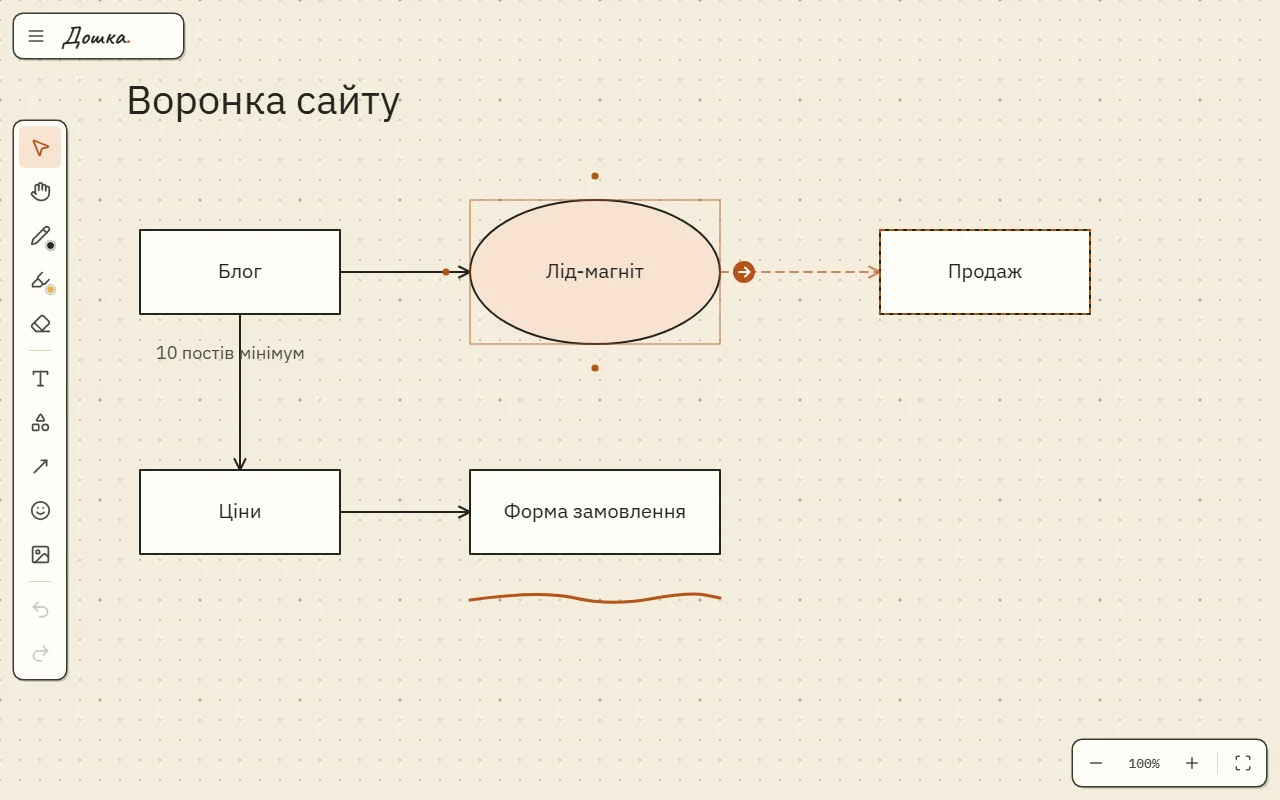
Наводите мишку на фігуру, і на її сторонах з’являються маленькі крапки. Наводите на крапку, і Дошка показує стрілку до найближчої фігури в цьому напрямку. Один клік, і зв’язок готовий.
Стрілки бувають прямі, плавні й «квадратами», тобто з прямими кутами, як у блок-схемах. Коли ви перетягуєте фігуру, стрілка тягнеться за нею. Для схеми з десятка блоків це економить кілька хвилин, а для курсу з двадцяти схем економить вечір.
Як працює «підказка до найближчої фігури»+
Дошка рахує відстань від крапки до сусідніх фігур у напрямку, куди дивиться крапка. Ту, що ближче й лежить на цій осі, вона й пропонує. Якщо поряд кілька, виграє найближча.
Хочете інакше? Просто перетягніть кінець стрілки до іншої фігури. Підказка лише швидший шлях, а не пастка.
Підказки замість сітки: онлайн-дошка, що вирівнює сама
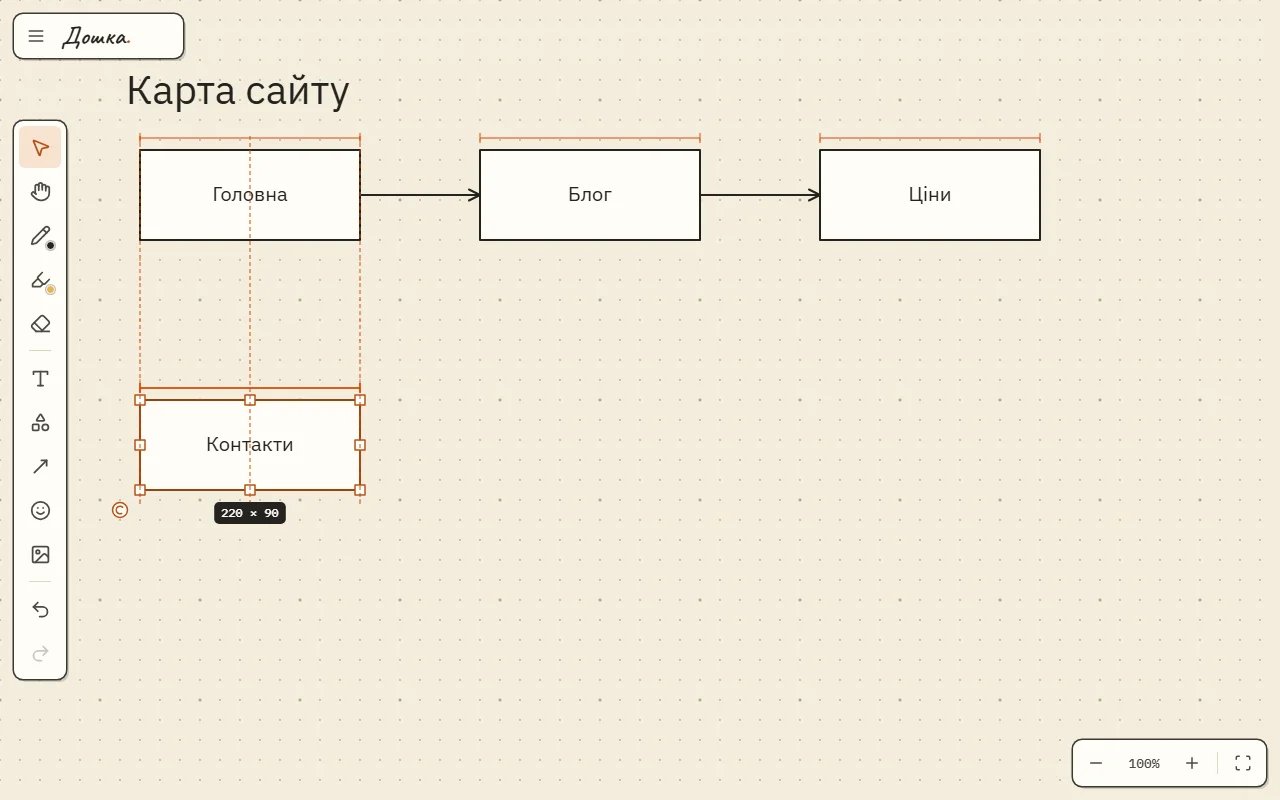
Сітка в крапку на фоні створює настрій блокнота. Вирівнювати допомагає інше: коли ви тягнете фігуру, вона сама «прилипає» до країв і центрів сусідів. Видно тонкі лінії вирівнювання, а ще однакові відступи між трьома фігурами й однакові розміри.
Коли розтягуєте фігуру, поруч з’являється мітка з шириною й висотою, наприклад 220 × 90, і видно, з якою сусідньою фігурою збігаються розміри. Така онлайн-дошка не змушує міряти лінійкою. Хочете вимкнути прилипання на мить? Затисніть Alt.
Іконки і бренди: понад 10 000 штук
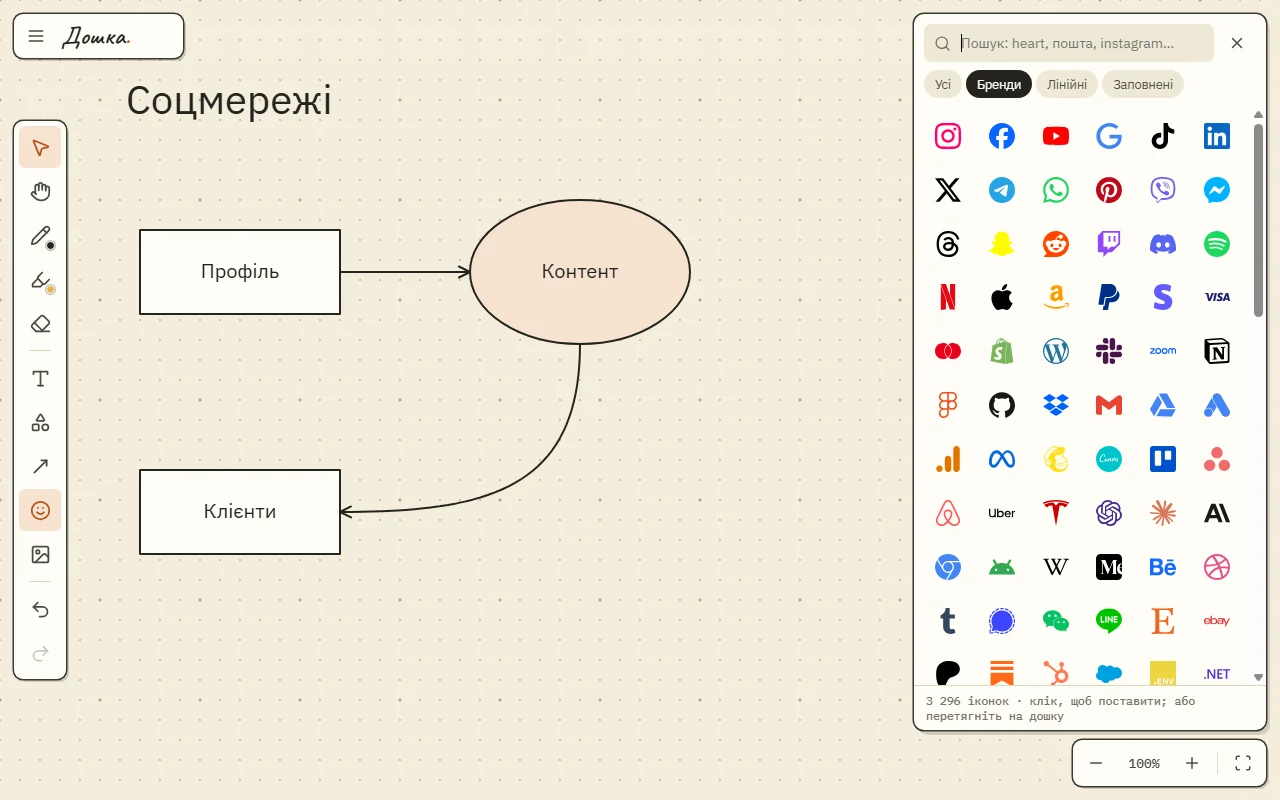
Для схеми про воронку, соцмережі чи послуги потрібні логотипи, і онлайн-дошка без них швидко набридає. Тут вбудовано набори Lucide й Tabler та понад 3 000 брендів у фірмових кольорах.
Пошук працює й українською: «пошта», «інстаграм», «гроші». Клацаєте по іконці, і вона стає на дошку, або перетягуєте її мишкою.
Іконки лежать усередині програми, тож у Windows-версії вони теж доступні без інтернету.
Три сценарії, де онлайн-дошка економить вечір
Ірина пише курсову з історії мистецтв. Вона малює пером карту понять: стилі, художники, роки. Перо тисне по-різному, гумка стирає зайве, долоня не заважає. Крива лінія в кінці стає рівною, якщо притримати перо.
Дошку вона відкриває на Surface і не встановлює нічого.
Андрій готує для школи схему вступу: заява, співбесіда, наказ, зарахування. Схему він зберігає як PNG із прозорим тлом правою кнопкою миші. Той самий файл лягає і на білий слайд, і на кольоровий банер сайту без білої рамки.
Олеся навчає менеджерів. Їй потрібна схема воронки з іконками сервісів: пошта, месенджер, CRM. У Дошці вона шукає іконки українською та бере фірмові кольори брендів. Схема займає десять хвилин замість цілого вечора.
Порівняльна таблиця: онлайн-дошка Дошка проти Miro, Excalidraw і draw.io
Порівнюємо чотири інструменти за тим, що відчуває людина: хто малює, скільки коштує рік, чи є перо й чи працює все без інтернету. Ціни наведено на 24 листопада 2026 року.
| Інструмент | Хто малює | Безкоштовно | Платно за рік для одного автора | Перо і дотик | Без інтернету | Головне обмеження |
|---|---|---|---|---|---|---|
| Дошка | один автор | 30 днів, одна дошка | 1 188 грн, до 10 дошок | так, з тиском, гумкою і відкиданням долоні | програма для Windows | немає спільного редагування, коментарів, шаблонів і ШІ |
| Miro | команда одночасно | є, з обмеженням на кількість дошок | Starter близько $8 за учасника на місяць, це приблизно 4 032 грн | працює | ні | для одного автора дорого, і купа кнопок для команди |
| Excalidraw | один чи кілька за посиланням | так, без акаунта | Plus $6 за користувача на місяць, приблизно 3 024 грн | працює | у браузері після першого відкриття | брендові значки додаються бібліотеками, а не вбудовані |
| draw.io | один автор | так, без акаунта | 0 грн | працює, без акценту на перо | є настільна програма | інтерфейс технічний, схожий на офісну програму |
Ця онлайн-дошка коштує у три-чотири рази менше за Miro Starter, але чесне порівняння тут не буває простим.
Miro дає команду, коментарі й шаблони, і якщо вони вам потрібні, переплачувати не доведеться. Дошка дає тишу, перо і швидку схему. Це дві різні покупки, і порівнювати їх лише за ціною нечесно.
Актуальні тарифи конкурентів дивіться на сторінці цін Miro, на сторінці Excalidraw Plus і на diagrams.net для draw.io.
Що входить у Дошку і що не входить
Ось повний список того, що вміє ця онлайн-дошка, без маркетингових гачків. Кожен пункт можна перевірити за пів години тестування.
Що входить у Дошку
- Безкоштовні 30 днів без картки, одна дошка
- Pro: до 10 дошок, автозбереження в хмарі, кошик на 14 днів
- Крапки-стрілки, прямі, плавні й квадратні лінії
- Фігури, текст, малювання пером, гумка, прозорі PNG
- Понад 10 000 іконок, 3 000 брендів, пошук українською
- Картинки з буфера, стиснуті до 100 КБ у webp
- Програма для Windows без інтернету, файл-копія .doshka
Що не входить
- Спільного редагування немає, дошка одного автора
- Коментарів, стікерів, таймерів і голосування немає
- Шаблонів і ШІ-кнопок немає, ми їх свідомо прибрали
- Після 30 днів безкоштовного періоду редагувати можна тільки з тарифом
- Окремого мобільного застосунку немає, працює браузер на планшеті й телефоні
Що буде з дошкою після закінчення 30 днів+
Дошка нікуди не зникає. Її можна відкривати, переглядати й завантажувати як PNG. Для нових змін потрібен тариф: 99 грн на місяць, оплата одразу за рік, це 1 188 грн.
Платити за рік наперед ми обрали свідомо: так немає автосписань з вашої картки. Ви залишаєте заявку, отримуєте рахунок на пошту, а після оплати ми вмикаємо тариф вручну.
Кошик і автоматичне очищення+
Видалена дошка 14 днів лежить у кошику, її можна відновити. Потім система видаляє її повністю, разом із картинками, щоб не займати місце. Це корисно і вам, і нам: ми не тримаємо чужі застарілі файли.
Онлайн-дошка для Windows: працює без інтернету
Онлайн-дошка без інтернету звучить дивно, але саме це потрібно, коли Wi-Fi в аудиторії працює тільки на папері. Ще одне прохання з нашого списку звучало так: «чи можна поставити це як програму?». Можна.
Програма для Windows 10 і 11 ставиться звичайним інсталятором і запускає ту саму Дошку на вашому комп’ютері. Усі інструменти, іконки та експорт у PNG працюють без інтернету.
Безкоштовний тариф у програмі такий самий, як онлайн: 30 днів і одна дошка. Якщо ви вже платите за Pro, у програмі натискаєте «Увійти й підключити Pro», входите у свій акаунт у браузері, і програма підхоплює тариф. Ніяких ключів вигадувати чи вводити не треба.
Як перенести дошки між програмою і сайтом+
Онлайн-акаунт і програма працюють окремо. Для переносу є кнопка «Копія даних» у списку дощок. «Зберегти копію» дає файл .doshka з усіма дошками, «Відкрити копію» додає дошки з такого файлу. Працює і в онлайн-версії, тож перенести можна в будь-який бік.
Що робить програма, коли інтернету немає+
Редагування й експорт не залежать від мережі. Раз на добу програма звіряє тариф із сервером. Якщо мережі довго немає, Pro діє до 30 днів з останнього підтвердження. Потім програма просто повертається до безкоштовного режиму, а ваші дошки лишаються на місці.
- Завантажте установникНа сторінці Дошки натисніть «Завантажити для Windows», файл Doshka-Setup.exe.
- Запустіть і малюйтеПрограма відкривається в окремому вікні, акаунт для безкоштовного режиму не потрібен.
- Підключіть Pro, якщо він у вас єУ модалці «Тариф і копія» натисніть «Увійти й підключити Pro», далі вхід у браузері.
- Зберігайте копіїКнопка «Копія даних» створює файл .doshka, який можна покласти на флешку чи в хмару.
Перша схема: онлайн-дошка за шість кроків
- Відкрийте ДошкуПерейдіть на doshka.osvitanok.com і створіть акаунт. 30 днів безкоштовні, картка не потрібна.
- Додайте першу фігуруОберіть прямокутник чи овал і підпишіть. Фігури самі вирівнюються по сусідах.
- З’єднайте стрілкоюНаведіть на фігуру, потім на крапку, клацніть по підказці. Усе: стрілка стоїть.
- Додайте іконкиЯкщо схема про сервіси чи соцмережі, знайдіть іконку українською і перетягніть на дошку.
- Збережіть PNGПравою кнопкою миші оберіть виділене чи всю дошку, із прозорим тлом чи ні.
- Покладіть у слайдВставте PNG у презентацію, наприклад у ПростоСлайдер.
Один акаунт: Дошка, ПростоСлайдер і СкрінКастер
Онлайн-дошка рідко живе сама: схему малюють, щоб вставити в презентацію або пояснити голосом. Тому наші три додатки працюють з одним акаунтом Osvitanok: той самий email і пароль діють у Дошці, ПростоСлайдері і СкрінКастері.
Типовий ланцюжок виглядає так: малюєте схему в Дошці, вставляєте PNG у слайд конструктора презентацій і записуєте пояснення в СкрінКастері, а коли треба швидко зловити шматок екрана, є програма для скріншотів у тому ж СкрінКастері.
Усі три Pro разом коштують 2 316 грн на рік замість 3 456 грн окремо, тобто мінус 33%. Деталі та форма замовлення на сторінці усіх додатків Osvitanok.
Кому ця онлайн-дошка не підійде
Ми не будемо переконувати вас, що Дошка підходить усім. Ось коли краще обрати щось інше:
- вам потрібні спільні дошки, де п’ятеро людей малюють одночасно, і тут виграє Miro;
- вам потрібен величезний набір шаблонів для воркшопів: Miro чи FigJam;
- ви хочете технічні діаграми з бібліотеками фігур для архітектури чи мереж: draw.io;
- вам потрібен безкоштовний швидкий нарис без реєстрації: Excalidraw.
Дошка найкраща, коли вам треба швидко намалювати схему одним пером чи мишкою, зберегти картинку й не думати, де кнопка «Upgrade».
Приватність: де лежать ваші дошки
Кожна онлайн-дошка лежить у вашому акаунті Osvitanok. Під час входу на пошту приходить код підтвердження, і він захищає дошки навіть тоді, коли пароль потрапив до чужих. У програмі для Windows усе лежить на вашому комп’ютері в папці програми. Деталі описані в Політиці конфіденційності.
Порівняння з погляду бізнесу, цін і команди ми розібрали на cityprofit.ua: Дошка проти Miro, FigJam, Excalidraw і draw.io.
Часті питання: онлайн-дошка для схем
Онлайн-дошка Дошка: чи можна малювати разом із колегою?
Чи безкоштовна онлайн-дошка і що буде після 30 днів?
Яка онлайн-дошка працює з пером Surface і на планшеті?
Як зберегти схему як PNG із прозорим тлом?
Онлайн-дошка без інтернету: чи така є?
Скільки іконок у Дошці?
Чому картинки стискаються до 100 КБ?
Чим онлайн-дошка Дошка відрізняється від Miro?
Намалюйте першу схему за 5 хвилин
30 днів безкоштовно, без картки. Перо, палець чи мишка, а стрілки знаходять фігури самі. Або поставте програму для Windows і малюйте без інтернету.
Updated 24 November 2026 · 12 minute read
Natalia teaches biology at a lyceum. On Thursday she has to explain the water cycle to ninth graders: evaporation, clouds, rain, runoff. She opens an empty Doshka board, draws five shapes and joins them with arrows.
She hovers over a shape, dots appear on its sides, she clicks a dot and the arrow stretches to the nearest shape on its own.
The diagram is ready before the bell. Natalia saves it as a PNG and drops it into a slide. Before, she drew the same thing with a mouse inside a presentation and spent half an hour aligning boxes.
If one person draws the diagram, with a pen, a finger or a mouse, this online whiteboard called Doshka covers it for 1,188 UAH a year: a quiet canvas, arrows between shapes, PNG on right click and a Windows app that works offline.
For a live workshop with many cursors choose Miro. When the budget must be zero, Excalidraw and draw.io do the job.
Doshka is built by the team behind this site, so the comparison cannot be neutral. We say plainly where Doshka is weaker.
Competitor prices come from public pages and price reviews on 24 November 2026 and are converted at 42 UAH per dollar. Plans change often, so open the vendor pricing page before you buy.
An online whiteboard through a person’s eyes: what they really want
This online whiteboard did not start with an investor deck. It started with one short request: “make a minimal Miro that works with a pen on a Surface Pro”.
Then we took a screenshot of Miro and drew red arrows over everything we did not need.
The list turned out odd. An “Upgrade” button, a timer, reactions, comments, video, an AI helper, templates, sticky notes, a “where shall we start” bar.
All of it is useful in a workshop for twenty people. For someone drawing a diagram for a lesson, it is noise.
The wish that started Doshka
I need a dotted notebook that knows how to do arrows. I can ignore the rest.
Then the “want” list wrote itself, and it is so practical that we barely changed it:
- a pen with pressure, an eraser on the other end, a palm that does not get in the way;
- arrows that attach themselves to the next shape (straight, smooth and with right angles);
- hints instead of a grid: shapes align to their neighbours on their own;
- Ctrl+Z that really steps back, plus undo and redo buttons in the toolbar;
- while you stretch a shape you see width and height and how they match neighbouring shapes;
- a pasted image is squeezed to 100 KB webp so the board never lags;
- as many icons as possible, brand logos included, and no templates at all;
- saving as PNG with the right mouse button.
That is how Doshka was born. Below we look at how it feels in use, what it costs next to Miro, Excalidraw and draw.io, and who should not buy it.
An online whiteboard comes in two kinds: a workshop wall and a diagram notebook
The phrase “online whiteboard” hides two different tools. The first is a big wall of sticky notes where dozens of people move blocks, vote and start timers.
The second is a dotted notebook where one person draws a diagram, a process or a concept map and saves the result.
- Workshop wall (Miro, FigJam): live cursors, templates, comments, AI helpers.
- Diagram notebook (Doshka, Excalidraw, draw.io): quick start, few buttons, export to an image.
Most teachers, students and methodologists want the second kind. They need a diagram for a lesson and have no use for sticky-note facilitation.
If you recognise yourself, this online whiteboard for diagrams will save you a lot of nerves. If you run a workshop with ten people, skip ahead to “Who this online whiteboard is not for”.
An online whiteboard with a pen: Surface Pen, pressure and straight lines
The main test of an online whiteboard for a pen is whether it stays out of your way. When you draw on a tablet your hand rests on the screen, and good software ignores the palm.
Our online whiteboard works like this: the pen draws, a finger moves and zooms the canvas, and the palm just rests.
The pen sends pressure, so the line gets thicker when you press harder. The eraser on the other end erases like the real thing.
And there is a small detail you notice at once: hold the pen at the end of a line and it becomes straight, while a wobbly circle or rectangle turns neat.
Which devices Doshka supports besides Surface Pro+
Doshka runs in the browser, so it does not care what is in your hand.
A Surface pen, a Wacom pen, a stylus for iPad, a finger on a phone, a mouse on a normal computer. The browser reports the device type and Doshka reacts to pressure, eraser and touch differently.
We tested on a Surface Pro 8, where the project began. Other devices work through the same pointer events, but we honestly did not test every tablet in the world.
Why your palm does not ruin the diagram+
When you draw with a pen the system sees two kinds of touch: the pen and the palm. Doshka accepts the pen as drawing and rejects the wide touch of the palm. A finger moves the canvas and two fingers zoom it.
It sounds minor until you try a board that treats every palm as one more line.
An online whiteboard with arrows that find the next shape
In Miro and Excalidraw you drag an arrow from one shape to another and try to catch the edge. Here the online whiteboard works more simply.
You hover over a shape and small dots appear on its sides. You hover over a dot and Doshka shows an arrow to the nearest shape in that direction. One click and the link is made.
Arrows can be straight, smooth or elbow, meaning with right angles like in flowcharts. When you move a shape the arrow follows. For a diagram of ten blocks this saves a few minutes, and for a course with twenty diagrams it saves an evening.
How the “nearest shape” hint works+
Doshka measures the distance from the dot to neighbouring shapes in the direction the dot faces. The nearest one on that axis is proposed. If several are close, the closest wins.
Want something else? Just drag the end of the arrow to another shape. The hint is a faster path, not a trap.
Hints instead of a grid: the online whiteboard that aligns by itself
The dotted grid in the background creates the notebook mood. What helps alignment is something else: when you drag a shape it snaps to the edges and centres of its neighbours. You see thin guide lines, equal gaps between three shapes and equal sizes.
When you stretch a shape a label appears with width and height, for example 220 × 90, and you can see which neighbouring shape has the same size.
Such an online whiteboard never makes you measure with a ruler. Want to switch snapping off for a moment? Hold Alt.
Icons and brands: more than 10,000
A diagram about a funnel, social networks or services needs logos, and an online whiteboard without them gets boring fast. Doshka has the Lucide and Tabler sets built in plus more than 3,000 brands in their own colours.
Search works in Ukrainian too: “пошта”, “інстаграм”, “гроші”. Click an icon and it lands on the board, or drag it with the mouse.
The icons live inside the app, so the Windows version has them offline as well.
Three scenarios where an online whiteboard saves an evening
Iryna writes a term paper on art history. She draws a concept map with the pen: styles, painters, years. The pen presses differently, the eraser removes the extra, the palm does not interfere. A wobbly line turns straight when she holds the pen.
She opens Doshka in the browser on a Surface and installs nothing.
Andrii prepares an admission diagram for a school: application, interview, order, enrolment. He saves the diagram as a PNG with a transparent background using the right mouse button.
The same file sits on a white slide and on a coloured site banner with no white frame.
Olesia trains sales managers. She needs a funnel diagram with service icons: mail, messenger, CRM. In Doshka she searches icons in Ukrainian and takes the brand colours. The diagram takes ten minutes instead of a whole evening.
Comparison table: Doshka vs Miro, Excalidraw and draw.io
We compare four tools by what a person feels: who draws, what a year costs, whether there is pen support and whether everything works offline. Prices are as of 24 November 2026.
| Tool | Who draws | Free | Paid per year for one author | Pen and touch | Offline | Main limit |
|---|---|---|---|---|---|---|
| Doshka | one author | 30 days, one board | 1,188 UAH, up to 10 boards | yes, with pressure, eraser and palm rejection | Windows app | no shared editing, comments, templates or AI |
| Miro | a team at once | yes, with a cap on boards | Starter about $8 per member a month, roughly 4,032 UAH | works | no | pricey for one author and lots of team buttons |
| Excalidraw | one or several by link | yes, no account | Plus $6 per user a month, about 3,024 UAH | works | in the browser after the first visit | brand logos come through libraries, not built in |
| draw.io | one author | yes, no account | 0 UAH | works, with no focus on the pen | desktop app exists | technical interface that looks like office software |
This online whiteboard costs three to four times less than Miro Starter, but an honest comparison is never simple here.
Miro gives you a team, comments and templates, and if you need them you will not be overpaying. Doshka gives you quiet, a pen and a fast diagram. These are two different purchases, and comparing them by price alone is unfair.
For current plans see the Miro pricing page, the Excalidraw Plus page and diagrams.net for draw.io.
What is in Doshka and what is not: an online whiteboard without the extras
Here is the full list of what this online whiteboard does, without marketing hooks. Every item can be checked in half an hour of testing.
What is included
- A free 30 days with no card, one board
- Pro: up to 10 boards, cloud autosave, a 14 day trash
- Dot arrows, straight, smooth and elbow lines
- Shapes, text, pen drawing, eraser, transparent PNG
- More than 10,000 icons, 3,000 brands, search in Ukrainian
- Clipboard images squeezed to 100 KB webp
- A Windows app that works offline and a .doshka backup file
What is not included
- No shared editing, a board belongs to one author
- No comments, sticky notes, timers or voting
- No templates and no AI buttons, we removed them on purpose
- After the free 30 days editing needs a plan
- No separate mobile app, the browser works on tablets and phones
What happens to a board after the 30 days end+
The board does not disappear. You can open it, view it and download it as a PNG. New changes need a plan: 99 UAH a month, paid for a year up front, which is 1,188 UAH.
We chose to charge a year in advance on purpose: there are no automatic charges from your card. You leave a request, receive an invoice by email and we switch the plan on by hand after payment.
The trash and automatic cleanup+
A deleted board sits in the trash for 14 days and can be restored. After that the system removes it completely, pictures included, so it does not take up space.
That is good for you and for us: we do not keep stale files of other people.
An online whiteboard for Windows: it works without internet
Another request from our list: “can this be installed as a program that works without a network?”. It can.
The Windows 10 and 11 app installs with a normal installer and runs the same Doshka on your computer. All tools, icons and PNG export work offline.
The free plan in the app is the same as online: 30 days and one board.
If you already pay for Pro, press “Sign in and connect Pro” in the app, sign in to your account in the browser and the app picks up the plan. No keys to invent or type.
How to move boards between the app and the website+
The online account and the app work separately. To move boards use the “Data copy” button in the board list.
“Save copy” gives a .doshka file with all boards and “Open copy” adds boards from such a file. It works in the online version too, so you can move boards either way.
What the app does when there is no internet+
Editing and export do not depend on the network. Once a day the app checks the plan with the server.
If there is no network for a long time, Pro stays active for up to 30 days from the last confirmation. After that the app simply returns to free mode, and your boards stay where they are.
- Download the installerOn the Doshka page press “Download for Windows”, the file is Doshka-Setup.exe.
- Run it and drawThe app opens in its own window and the free mode needs no account.
- Connect Pro if you have itIn the “Plan and copy” dialog press “Sign in and connect Pro”, then sign in in the browser.
- Keep copiesThe “Data copy” button creates a .doshka file you can put on a flash drive or in the cloud.
The first diagram: an online whiteboard in six steps
- Open DoshkaGo to doshka.osvitanok.com and create an account. 30 days are free, no card needed.
- Add the first shapePick a rectangle or an oval and label it. Shapes align to neighbours by themselves.
- Join with an arrowHover over a shape, then over a dot, click the hint. Done: the arrow is in place.
- Add iconsIf the diagram is about services or social networks, find an icon in Ukrainian and drag it onto the board.
- Save a PNGRight click and choose the selection or the whole board, with a transparent background or without.
- Drop it into a slidePaste the PNG into a presentation, for example in ProstoSlider.
One account: Doshka, ProstoSlider and ScreenCaster
An online whiteboard rarely lives alone: you draw a diagram to put it into a presentation or to explain it by voice. That is why our three apps share one Osvitanok account: the same email and password work in Doshka, ProstoSlider and ScreenCaster.
A typical chain looks like this: draw the diagram in Doshka, paste the PNG into a slide of the presentation maker and record the explanation in ScreenCaster.
When you need to grab a piece of the screen fast, the same ScreenCaster works as a screenshot tool.
All three Pro plans together cost 2,316 UAH a year instead of 3,456 UAH separately, which is 33% less. Details and the order form are on the Osvitanok apps page.
Who this online whiteboard is not for
We will not convince you that Doshka fits everyone. Here is when to pick something else:
- you need shared boards where five people draw at once, and Miro wins there;
- you need a huge set of workshop templates: Miro or FigJam;
- you want technical diagrams with shape libraries for architecture or networks: draw.io;
- you need a free quick sketch with no sign-up: Excalidraw.
Doshka is at its best when you need to draw a diagram fast with one pen or mouse, save a picture and not think about where the “Upgrade” button is.
Privacy: where your boards live
Each online whiteboard lives in your Osvitanok account. When you sign in, a confirmation code arrives by email and protects the boards even if a password leaks.
In the Windows app everything lives on your computer in the app folder. Details are in the Privacy Policy.
We compared the business side, prices and teams on cityprofit.ua: Doshka vs Miro, FigJam, Excalidraw and draw.io.
FAQ: online whiteboard for diagrams
Online whiteboard Doshka: can I draw together with a colleague?
Is the online whiteboard free and what happens after 30 days?
Which online whiteboard works with a Surface pen and on a tablet?
How do I save a diagram as a PNG with a transparent background?
Online whiteboard without internet: is there one?
How many icons does Doshka have?
Why are images squeezed to 100 KB?
How is Doshka different from Miro?
Draw your first diagram in 5 minutes
30 days free, no card. Pen, finger or mouse, and the arrows find the shapes by themselves. Or install the Windows app and draw offline.